
LibreOffice Calc is a popular Microsoft Excel alternative that is part of LibreOffice. You can download LibreOffice for all major desktop operating systems and Calc will be installed alongside other modules automatically.
Using Calc works pretty much the same as in Microsoft Excel. You enter data in a spreadsheet and may use advanced features such as functions or charts manually or automatically.
One of the most common things that Calc users do is calculate the sum of numbers, e.g. of a column or a row, when using Calc.

You can highlight the numbers to get the sum and the average displayed to you in the status bar of the program; this may be sufficient for some tasks, but automation may speed things up further, especially if you use a function in templates as it will then be available automatically when you use that template.
You need to use a function if you want the sum to be calculated automatically by the program. Here is how that is done.
First, using menus
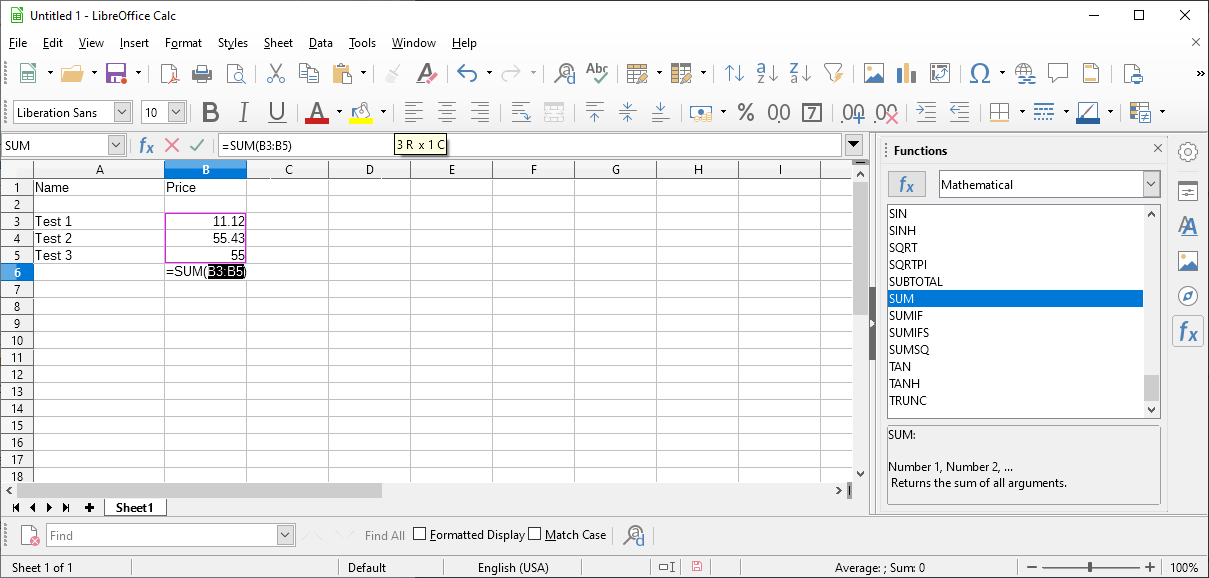
- Select View > Function List. Calc displays functions in a sidebar that it attaches to the right of the spreadsheet.
- If you see SUM already, go to step 3. If SUM is not displayed as a function, select Mathematical from the list and scroll down until you see SUM listed.
- Click with the mouse button on the field below or to the right of the column or row with the numbers that you want to calculate the sum for.
- Double-click on SUM to add the function to the field.
- Use the mouse to select all fields that you want included using a single-click on the first field, the mouse to move, and the Enter-key on the keyboard to complete the operation.
Calc should display the sum of the selected fields now automatically. The sum changes automatically when you change any of the numbers in the selected fields.
The manual method of adding the SUM function to Calc
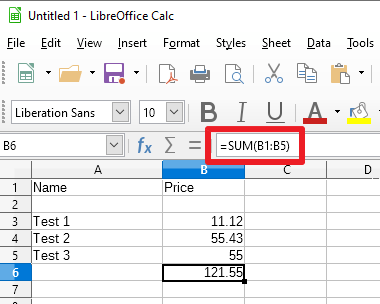
The SUM function is pretty basic and easy to understand. You may add it manual to a field instead to speed things up.
All you have to do is add =SUM(XY:XZ) to the field, and replace XY and XZ with cell identifiers in the format B1 or D7. To calculate the sum of the five fields B1 to B5, you use the function =SUM(B1:B5).
Remember to tap on the Enter-key whenever you have added or edited a function.
Select the field with the function to edit it in the edit field at the top of the spreadsheet.
Now You: do you use functions in Excel or Calc?
Thank you for being a Ghacks reader. The post How to sum numbers in LibreOffice Calc automatically appeared first on gHacks Technology News.
https://ift.tt/3rvzLDG
from gHacks Technology News https://ift.tt/38AsxFB

No comments:
Post a Comment