
The native antivirus client of the Windows 10 operating system, Microsoft Defender, has started to flag the hosts file on the system as malicious if it contains redirects for certain Microsoft servers.
The hosts file is a simple plain text designed to redirect connections. Users find it under C:\Windows\System32\drivers\etc\hosts on any system and it is easy enough to redirect requests. It has been used for ages to block known malicious sites or advertisement sites.
All you have to do is add redirects in the form of 127.0.0.1 www.microsoft.com to the hosts file to redirect requests to the site "www.microsoft.com" in this case to the local computer. The effect is simple: the request is blocked.
With the release of Windows 10 came an increased Telemetry server blocking usage. Privacy tools would add known Telemetry servers to the hosts file to block connections and thus the transmission of Telemetry data to Microsoft.
As of July 28, 2020, it appears that Microsoft Defender is flagging hosts files as malicious if they contain certain redirects. According to Günter Born, the following versions introduced the new behavior:
- Antimalware-Clientversion: 4.18.2006.10
- Modulversion: 1.1.17300.4
- Antiviren-Version: 1.321.144.0
- Antispyware-Version: 1.321.144.0
Microsoft Defender Antivirus flags certain hosts file changes as a threat. An attempt to add telemetry.microsoft.com and microsoft.com redirects to 127.0.0.1 to the hosts file resulted in Microsoft Defender flagging the file and restoring the original version.
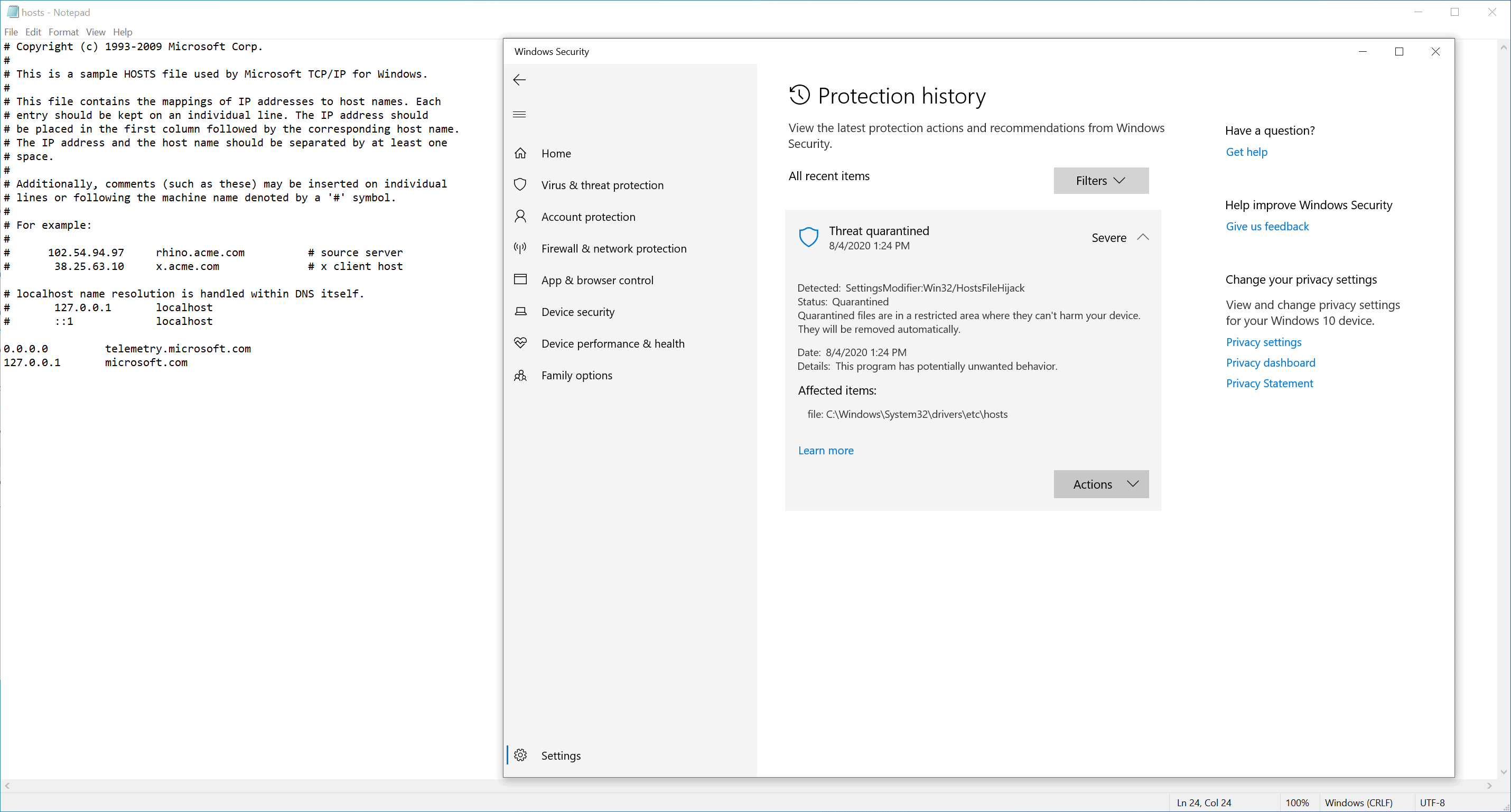
Attempts to save the file may display the following notification by Microsoft Defender:
Operation did not complete successfully because the file contains a virus or potentially unwanted software.
Restoring of the file did not restore the listing. Bleeping Computer's Lawrence Abrahams ran a few tests and discovered the following servers that Microsoft Defender flags when they are added to the hosts file on Windows 10 devices.
www.microsoft.com
microsoft.com
telemetry.microsoft.com
wns.notify.windows.com.akadns.net
v10-win.vortex.data.microsoft.com.akadns.net
us.vortex-win.data.microsoft.com
us-v10.events.data.microsoft.com
urs.microsoft.com.nsatc.net
watson.telemetry.microsoft.com
watson.ppe.telemetry.microsoft.com
vsgallery.com
watson.live.com
watson.microsoft.com
telemetry.remoteapp.windowsazure.com
telemetry.urs.microsoft.com
It is possible that other servers will also be seen as a threat by Microsoft Defender. Windows 10 users may allow the threat in Microsoft Defender, at least for now, to add these redirects to the file again. The problem with the approach is that it will allow all modifications, even those by malicious software. Another option is to turn off Microsoft Defender and to start using a different security solution for Windows.
A false positive seems unlikely considering that the list of servers includes mostly Telemetry servers.
Windows 10 tools that add entries to the hosts file may be affected by this negatively. Most privacy tools that manipulate the hosts file to block Telemetry will certainly fail to add the entries to the hosts file if Microsoft Defender is the resident antivirus solution.
Now You: do you use Microsoft Defender or another security solution on Windows?
Thank you for being a Ghacks reader. The post Microsoft Defender flags hosts files with Microsoft server redirects as malicious appeared first on gHacks Technology News.
https://ift.tt/39Wvh0d
from gHacks Technology News https://ift.tt/2XoQtXM

No comments:
Post a Comment